Attention broadcasters!
We have officially launched Smart Clips—our solution for discovering the best clips from your sermons and generating short form vertical content suitable for distribution on social platforms. This is all done using Vault AI and is available to all broadcasters. It's an incredible time-saving feature designed to increase listenership and engagement.
We live in an attention-deprived world. Shorts, reels, and bite-sized videos on YouTube and Facebook designed to be consumed on vertical phone devices have become the new normal and it simply cannot be ignored.
This presents a major opportunity.
Apart from the obvious negative effects of short attention spans, there is a silver lining in it all. It turns out that short sermon clips can actually be an effective way to introduce people to sound preaching. Think of it as a “teaser” to the full sermon—a compelling moment that grabs one's attention and draws listeners in.
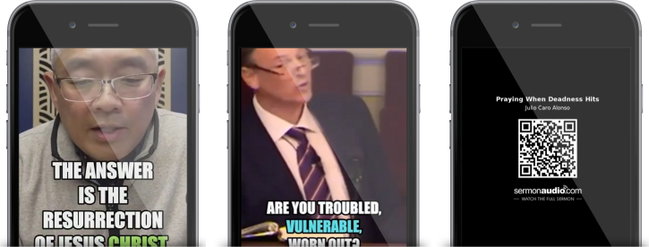
But until now, creating clips has been a time-consuming hassle, requiring video-editing skills, extra tools, and manual uploading to multiple platforms in the correct format. Who has time for all that?
That’s why we built Smart Clips.
Smart Clips takes your full-length sermon and uses Vault AI to automatically find the “best” clips. It then generates correctly-formatted vertical video clips complete with dynamic captions, optimized for viewers who often watch with the sound off.
Even better, Smart Clips is fully integrated into the Broadcaster Dashboard—no third-party services required. You can generate clips, review them, and even cross-publish directly to your social platforms. Each clip can also include a QR code at the end, guiding viewers straight back to the full sermon.
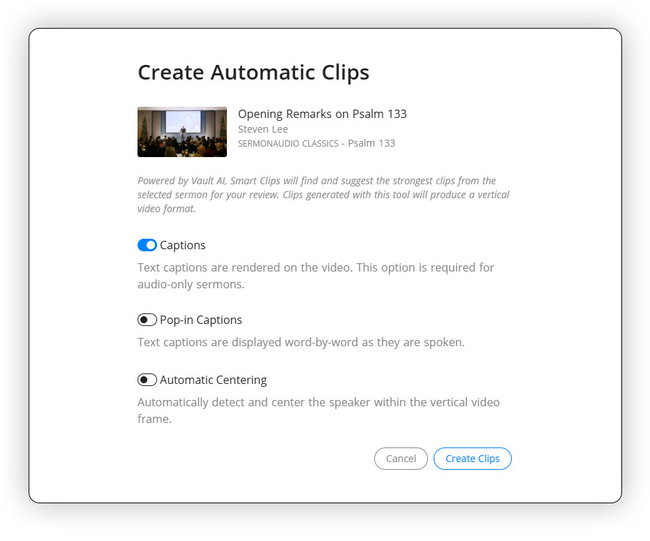
How it works—auto or custom.
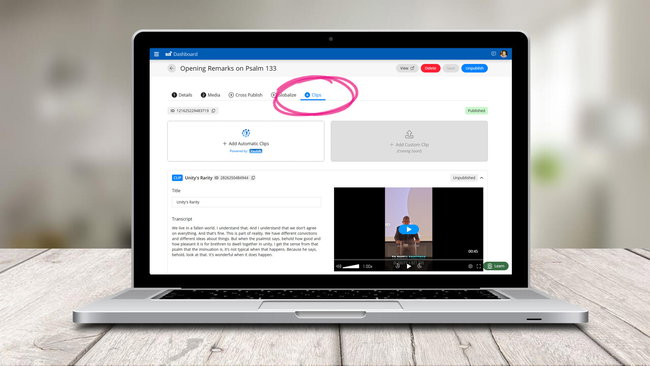
To use Smart Clips, simply go to any sermon in the Sermon Manager Dashboard and look for the new Clips tab. This is where you will manage the clips generated from the original sermon. In our system, we have tied Smart Clips very closely with the "parent" sermon in order to make it easy for users to enjoy the full-length sermon from any clip.
Inside the Clips tab, you'll be presented with an option to create clips automatically or manually. The automatic method will use our own Vault AI to find the "best clips" from the sermon whereas the custom method will give you the option to select the begin and end points. Both methods will produce a beautiful, vertical video with dynamic captions ready to share on social media!
Automatic centering option.
There’s also an option to automatically center the video. Since the clips are produced in a vertical format—which crops both sides of the frame—this feature helps ensure the speaker remains properly centered, even if they weren’t positioned in the middle of the original video.
A player that works with clips!
We’ve updated our native sermon player to integrate seamlessly with the new Clips Panel. You can now easily browse all clips associated with a sermon and quickly navigate back to the full original message. It’s a powerful way to ensure every clip remains clearly connected to its source sermon.
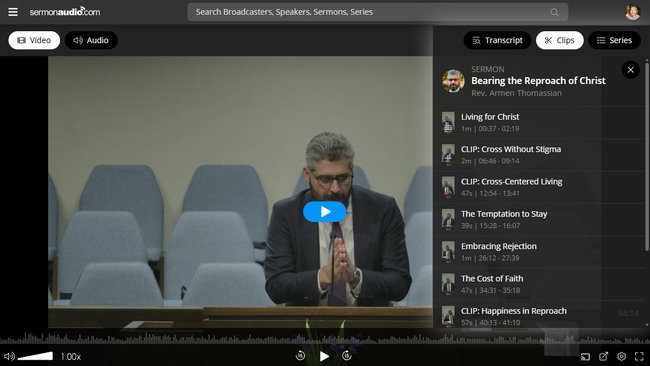
This is not about replacing sermons with short clips.
This is about using clips as a tool to scatter the seed—sending out sermon “hooks” into the public square and guiding listeners back to the full preaching. Smart Clips is designed to help you extend your reach, amplify your sermon content, and engage the next generation where they already are.
Smart Clips is available now—and this is only the beginning.