The Importance of Transcript Review
While the AI technology that drives our automatic transcription and translation systems are powerful, they aren't perfect and are capable of making mistakes. As such, we include points in the process where the broadcaster can review the transcripts that are generated and approve them before proceeding to the next automatic step in the process.
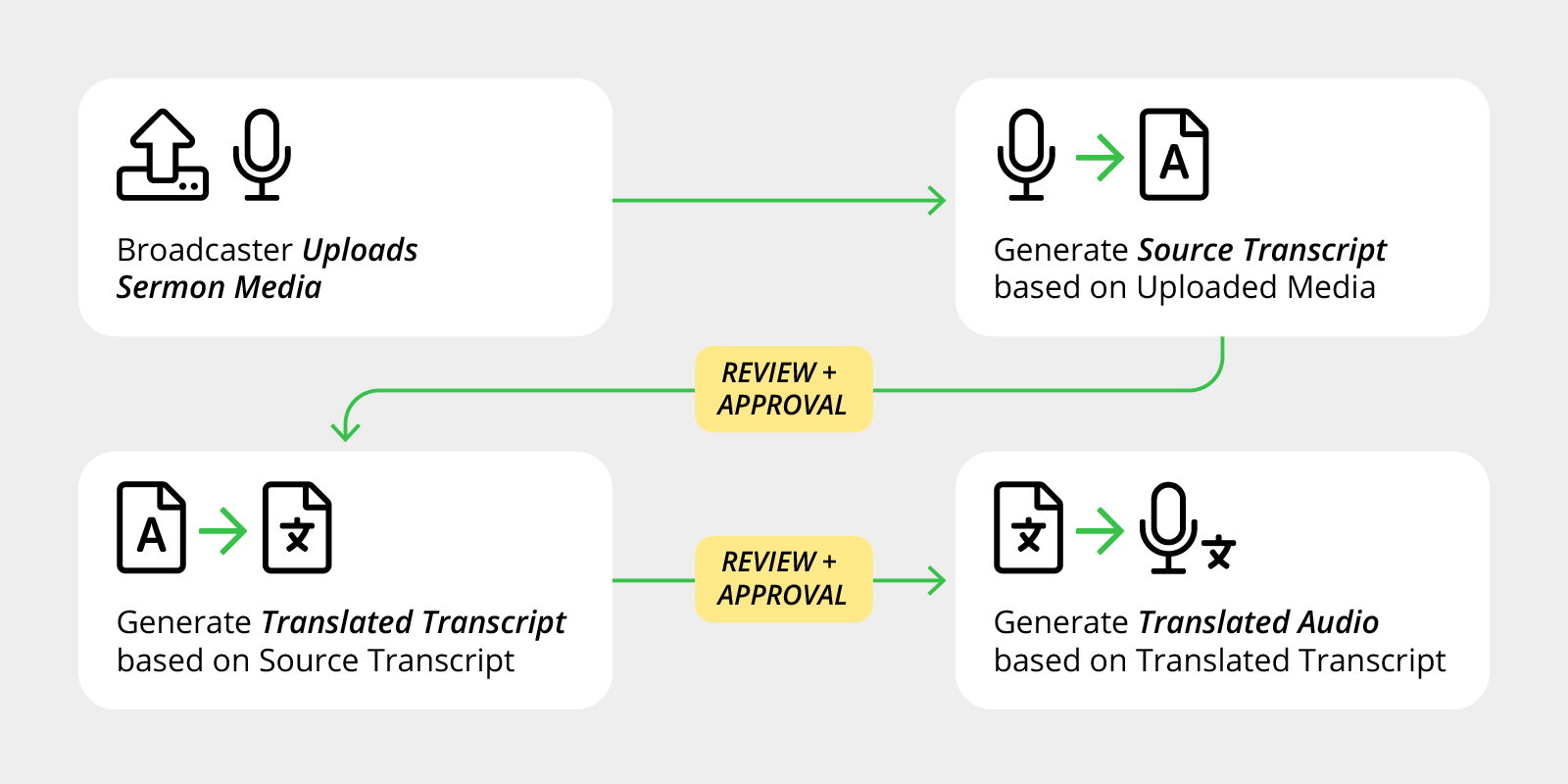 Automatic Translation Flow
We believe it's important for broadcasters to have human proofreaders who can verify the accuracy of both the source transcript and the translated transcript for any given sermon.
Reviewing Source Language Transcripts
A source transcript is the transcript derived from the sermon that you uploaded in its original language. For most broadcasters, this is an English transcript.
Before you can order automatic translations for a sermon, you need to review and approve the transcript that is generated from the original audio or video file that you uploaded. For the best automatic translation, we highly recommend proofreading and editing your source transcripts to optimize the translation process. Here are a few things that you should look out for when proofreading.
Paragraph Breaks
The transcript that is automatically generated will sometimes not have any paragraph breaks. Adding paragraph breaks to separate key ideas in the sermon can help to ensure that the translated transcript will retain the intended meaning. (more detail needed)
Proper Punctuation
Sometimes, an auto-generated transcript might be missing punctuation marks, which can dramatically change the meaning of a phrase. (e.g., "Don't! Stop!" vs. "Don't stop!") If left uncorrected, such unintended meanings will propagate to any automatic translations that are processed. Checking for correct punctuation is essential to an accurate translation.
Misspelled Words
Occasionally, the auto-generated transcript might confuse some words that sound similar (e.g., "know" and "no"). In some circumstances this can even lead to mistranslations that completely reverse the intended meaning of a phrase.
Smart Edit
To expedite the proofreading and editing process, we provide a tool that will automatically make edits to the transcript in preparation for translation. This AI-powered tool can optimize the grammar and phrasing for a more reliable translation. Be sure to review the changes, as AI is not a perfect technology, and can make mistakes.
Reviewing Translated Transcripts
Once your original language transcript has been translated into another language, you are given the opportunity to review the translated transcript before a voiced audio translation is generated. If possible, we recommend that broadcasters work with human translators to ensure the accuracy of a translation.
Translator Dashboard Permissions
In the Broadcaster Dashboard's Account Managers page, translators that have a SermonAudio user account can be given Global Sermons Manager permissions, which gives them access to the Translations Manager page under your broadcaster account. In the Translations Manager, users can review and approve transcripts that are pending review. Once transcripts have been approved, the editor can then automatically proceed to the audio generation step.
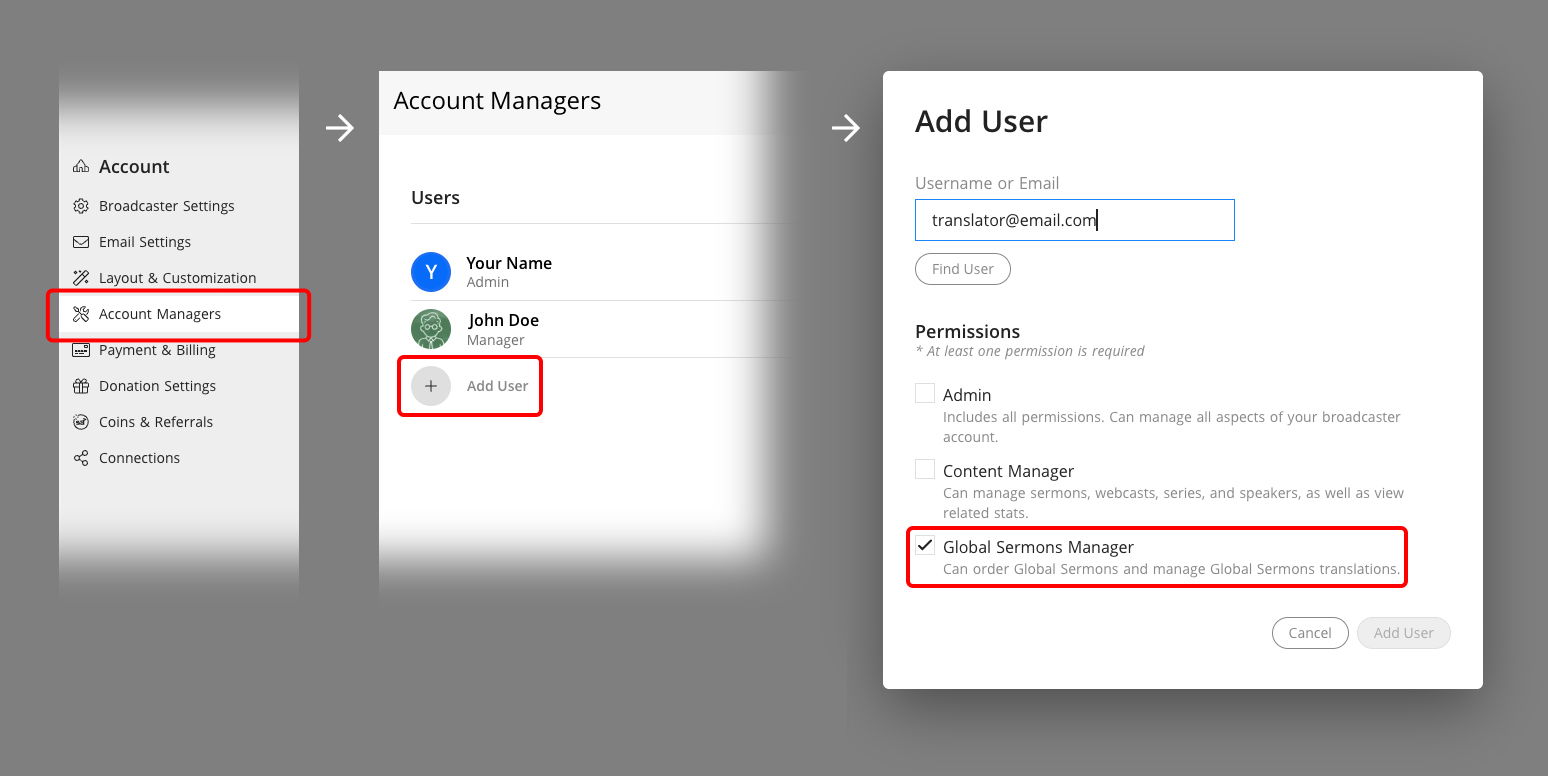 How to add a translator in the Dashboard